 ZH














技巧与指南
Custom Twitch and Discord emotes: a guide for streamers
Emotes make a community feel like a club. Sizes, readability tips and ideas for emotes and sub badges that viewers love to spam.
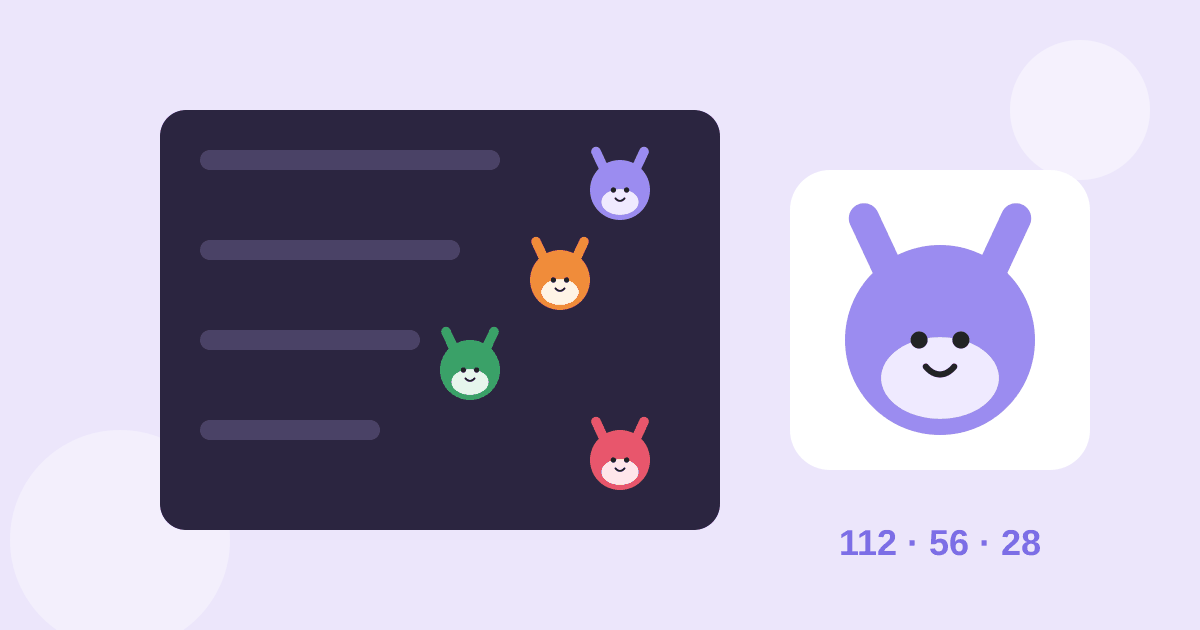
Emotes are the language of a stream chat. Custom ones give viewers a reason to subscribe and make your channel instantly recognisable when they are used across other chats.
Sizes you need
- Twitch emotes: 112×112, 56×56 and 28×28 px PNG (or upload one large square image and let Twitch resize it). Max 1 MB.
- Twitch sub badges: 72×72, 36×36 and 18×18 px.
- Discord emoji: 128×128 px recommended, under 256 KB; animated GIFs work on boosted servers.
- YouTube channel emoji: square images for members, displayed very small.
Make them readable at 28 pixels
- Big head, simple face, strong outline.
- One clear emotion per emote; exaggerate it.
- Avoid text — or keep it to one short word in bold letters.
- Test on dark and light chat backgrounds.
Emote set ideas
- Hype, love, laugh, rage, sad, “GG”, “lurk”, “pog”-style surprise.
- Your avatar or pet as the base character.
- Inside jokes from your stream — the most loved emotes usually come from the community.
Rules to know
Platforms review emotes. Avoid copyrighted characters, offensive gestures and anything that imitates official platform icons. Original art is the safest choice.
Order tip
Order a matching set (for example 6 emotes + 3 badges) from the same artist, so your channel has one consistent style.
相关文章
查看全部 技巧与指南 Comics in content marketing: how brands use comic strips to explain and sell
Short comics explain products, share customer stories and make LinkedIn and Instagram posts people actually read. Formats, ideas and a simple production plan.
 技巧与指南 How much does a custom illustration cost? What really affects the price
Complexity, style, usage rights, revisions and deadline — a clear guide to what you pay for when you order a cartoon, logo or mascot, and how to get the best value.
 技巧与指南 平面设计师必备的15款最佳AI工具:不同创意项目如何选择
了解15款AI设计工具的优缺点、免费方案,以及插画、品牌设计和动画制作的实用建议。